
Dear Support Team,
Pls we have issue with one of our clients, this issue is for 9xSP+P LCD sensorProbe2+ LCD Units installed at a remote site. They show “Disabled” status in AKCPro Server, while they could be pinged, and physically they are on and running. They are unable to be “Enabled”, the Enable function is Greyed.
Pls advise.
- abdelhadi asked 12 months ago
- last edited 12 months ago
- You must login to post comments
Hello,
Please check the details in this post on our Online Technical Forum below. Did you happen to check this?
The AKCP base units need to be on the same network subnet and also insure your firewall is not blocking them. Normally this would be the case.
If you are still having the same issue, please make sure the APS software and also the SP2+LCD units are upgraded to the latest versions of the software & the firmware.
Best regards,
AKCP Support Team
- AKCP Support Team answered 12 months ago
- You must login to post comments
Hi, thank you for the reply.
The remote sensorProbes have different network subnets. But they were connected to the AKCPro server a week ago, this issue of being “Disabled” happened two days ago.
We’ll will check the installation manual regarding network settings.
regards.
- abdelhadi answered 12 months ago
- You must login to post comments
Hello,
OK, thank you for your update on this. If the units are on different network subnets this would be why this issue is occurring.
Most likely the units IP address’s are being blocked by your firewall, network security software or other issues with your network.
We highly suggest you check with your network administrator on this to resolve the connectivity issues to the units.
Best regards,
AKCP Support Team
- AKCP Support Team answered 12 months ago
- You must login to post comments
Noted. We’ll check with the network administrator.
Thank you.
- abdelhadi answered 12 months ago
- You must login to post comments
Dear Customer,
Also, please check to make sure that the Server Integration option in the SP2+LCD is checked or enabled and also the Cloud Server is NOT enabled as shown in the screen shot below.
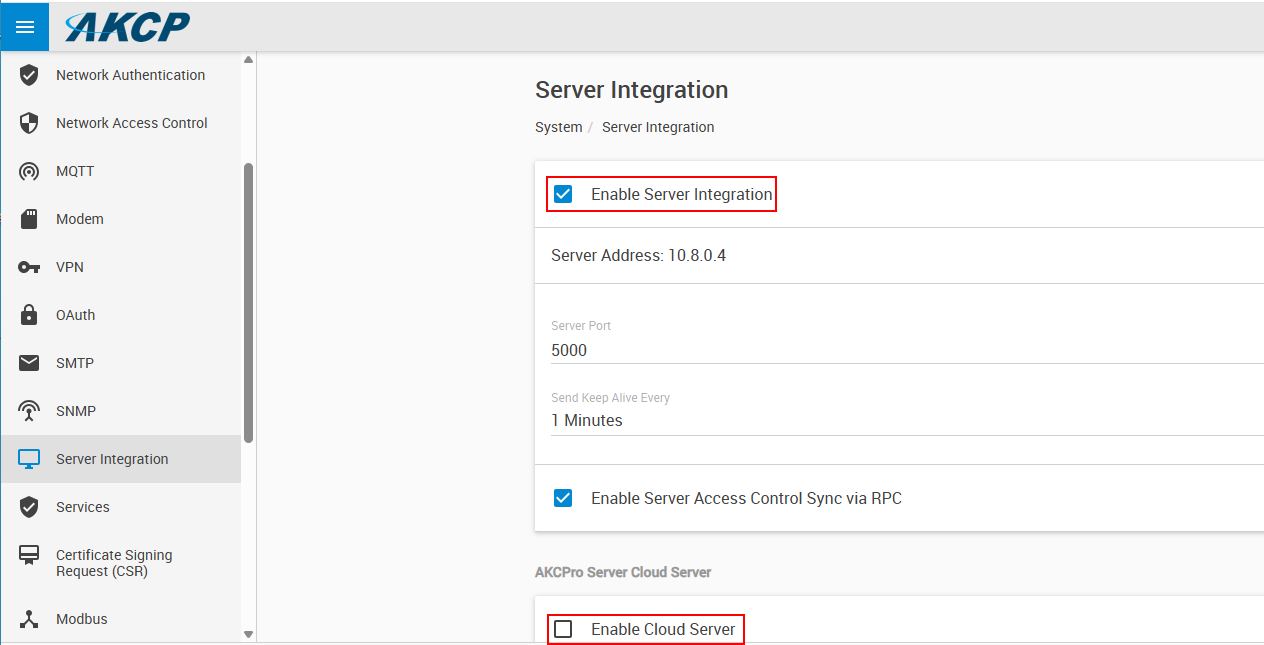
Best regards,
AKCP Support Team
- AKCP Support Team answered 12 months ago
- You must login to post comments
Okay, noted.
I believe these settings are fine (but will double check them) as there are probes in another remote site in different area are working well and shown in the AKCPro server.
Regards.
- abdelhadi answered 12 months ago
- You must login to post comments
Dear AKCP Support,
Following up on this issue, the client still facing “Disabled” units at AKCPro server. Your reply before was this was due to units being on different network subnets, the client is not convinced!
I am sending you (on support@akcp.com) a sheet for the IP Addresses to inspect and advise about the IP Addresses structure and how could this affect the communication with AKCPpro Server forcing units to go “Disabled”.
Pls check the IP Addresses sheet on the email and advise.
Thank you.
- abdelhadi answered 6 months ago
- You must login to post comments
Dear Customer,
As an update on this, please always check the following as we have seen these steps normally resolve the connection issues between the AKCP SP+/SEC base units and the APS (AKCPro Server Software).
This is normally an RPC communication issue between the units and the server.
RPC troubleshooting checklist:
– Check that APS Server Integration option is enabled on the device
– If the unit is part of the SP+ family: check that CloudAPS integration is turned OFF and the device rebooted once after turning this option off
– Check the netmask value and gateway setting on both ends (device and APS), they must be the same
– Check that APS PC’s firewall doesn’t block TCP port 5000 and SNMP UDP 161
– Check that any other firewall in-between doesn’t block TCP port 5000 and SNMP UDP 161 (it needs to be allowed on both sides)
– Check SP+/SEC Network Access Control feature, if it has a blacklist for network IP or network range used by the APS
– Recommended to also allow ping request and reply on the firewall
We hope this helps.
Best regards,
AKCP Support Team
- AKCP Support Team answered 5 months ago
- You must login to post comments
Hello,
After doing all what’ve suggested we are not facing “Disabled” units now.
Firmware was updated.
AKCPro Server Was updated.
Date & Time were fixed as per each city’s NTP server’s IP address.
APS Server Integration is enabled and Cloud Integration is turned Off.
Creating sensorProbe units SNMP Community Code to match with AKCPro Server.
Thank you.
- abdelhadi answered 5 months ago
- You must login to post comments
Please login first to submit.