
Hi AKCP Team
We were facing an issue where the Modbus connected to SPX+ tend to occur sensor error especially at active power phase one. reboot and swap Modbus adapter had been done, but sometimes normal sometimes occur sensor error. We had tried to update the firmware from 1.0.6154 to 1.0.6202 but failed. Support file has been sent to you as an attachment in the email I sent to you (support@akcp.com). Do let me know if you need more information on this. Thank you.
Best Regards
CY
IT Technical Engineer
- AKCP Support Team asked 4 weeks ago
- You must login to post comments
Dear CY,
Thanks very much for letting us know regarding your issues and including the details. We have checked the email you send as well that included the support file which was much appreciated and a big help.
The Modbus RS485 communication errors can be caused by several factors. Please follow these steps to help eliminate the issue:
1. Upgrade Firmware: Update the device to our latest release for your SPX+ unit that is posted on our website support portal.
2. Physical Check: Ensure the wiring between the SPX+ and the Power Meter is secure, with no sharp bends or damage to the cables.
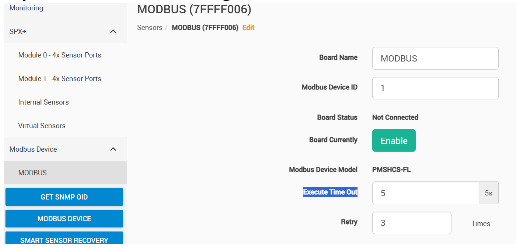
3. Adjust the PMS Modbus Settings: Set the Execution Timeout to 5 seconds and Retries to 3 as shown below in the SPX+ web UI.
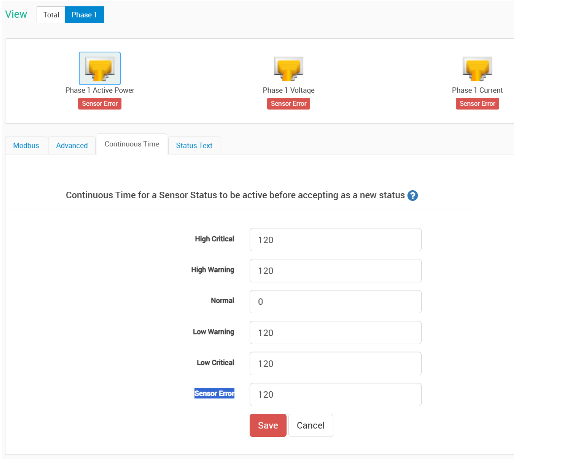
4. Adjust Continuous Time: Since the polling interval is 15 seconds, we suggest setting the Continuous Time for the Sensor Error status to 120 seconds. This allows the SPX+ to retry communication multiple times and only trigger an “Error” status if the failure persists for more than 2 minutes. Please reconfigure this for all sensors on the PMS as shown below in the SPX+ web UI.
After applying these changes, please monitor the system for a few days. If the issue persists, please provide us with a new support file with an update to our support team via the same email thread we replied to you on this.
Best regards,
AKCP Support Team
- AKCP Support Team answered 4 weeks ago
- You must login to post comments
Please login first to submit.