
Hello AKCP Team,
Our system administrator is no longer working for us so we don’t know the Administrator password for our AKCPro Server DCIM that was installed about 6 months ago. It seems the license is still working fine, but we can’t login to it.
Can you please send us the details on how to reset the password, as we can’t find anyway to do this?
Thank you,
AKCP End Customer
- You must login to post comments
Hello Valued AKCP Customer,
Thank you for your question on this. Please see below for the details on how to reset the APS password.
You can re-run the installer to reset the password for the built-in “admin” account. The existing data will be kept, only the admin password will be reset at this step:
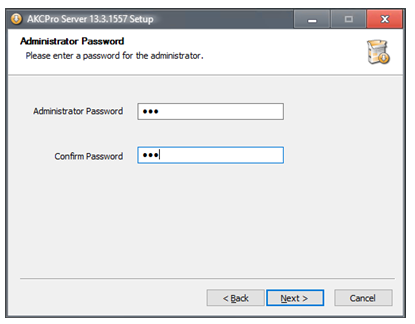
Important: You will have to use the same or a newer version of the APS installer which you have running. If you try it with an older version, it won’t be able to keep the existing data! Using the same or newer version, everything will be kept.
Without logging in to APS, you could make a backup of the existing data by stopping the APS service, then make a manual file copy the C:\ProgramData\AKCP contents.
You can run the APS installer with the service stopped, no need to restart it again.
After the APS has been reinstalled, you can log in with the new password for the “admin” user, and create additional users as required.
Here is our latest APS v16 installer, in case you don’t have it:
https://akcp-downloads.s3.us-west-2.amazonaws.com/APS/v16/AKCProServer-16.2.155.exe
Note: Only the APS uninstaller asks about “keep your data?” – just running the installer will always keep data without asking.
We hope this helps and please contact us directly at support@akcp.com if you need any further assistance and we will be happy to help.
Best regards,
AKCP Support Team
- AKCP Support Team answered 4 months ago
- You must login to post comments
Please login first to submit.