
Hello AKCP,
We bought a server network rack with some SPX+ modules from you. Now we want to monitor it. so i have been looking at snmp, but i rather not have additional software on our building control system.
We have security guards monitoring a building automation server (desigo CC) and i want do add the monitoring from the AKCP modules to that system.
The desigo CC ussually works with Bacnet protocol. now i read on your site that u also support bacnet protocol. but when i open the webinterface it doesnt show up.
Can u tell me how i can add the bacnet protocol to this module? Or is there a better way to monitor the system?
hope to hear,
best regards,
Tim
- You must login to post comments
Hello Tim,
First off, thank you for your questions and letting us know about the BACnet issue you are having on your SPX+ devices.
You will need to upgrade your device firmware to access the BACnet functionality. Please update to version 6195 using the download link below.
http://www.akcp.in.th/downloads/SP2%2B/spplus-h7-1.0.6195_20250701.zip
After the upgrade is complete, you can find the BACnet configuration under the Settings menu by selecting the BACnet page.
From there, you can enable the feature and set up the Device Instance Number, Device Name, and Port to activate the BACnet server capability on your SPX+ device.
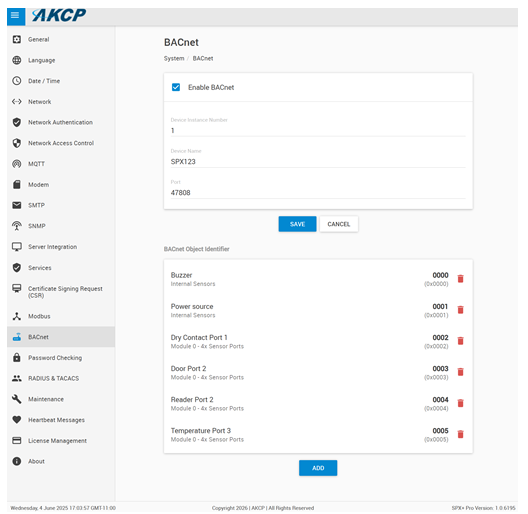
Once that is done, you can configure your Desigo CC system to retrieve sensor information from the SPX+ over BACnet TCP.
Please keep in mind that BACnet is a licensed feature. If your SPX+ unit does not have this license yet, simply send all of these details on to our sales & support team (sales@akcp.com & support@akcp.com) with your MAC address and our team will help you obtain that license.
Please also note that the BACnet feature is not supported on the previous versions (F4 & F7) AKCP SP+ base units.
We hope this helps.
Best regards,
AKCP Support Team
- AKCP Support Team answered 5 months ago
- You must login to post comments
Please login first to submit.