
Hello AKCP Team,
I am receiving this error message when trying to send SMS from my securityProbe 5ESV (SEC 5ESV-M4G) unit;
gsmsendsms[ERROR]: ME/TA error 'unknown

error' (code 500): sending sms to ....
We have made sure the firmware is upgraded to the latest version on your support portal and tried the other troubleshooting steps here;
1. Powered off the unit and checked the hardware.
2. Used a multimeter to measure the DC Voltage output of the PSU. It reads a stable 7.5 V.
3. Removed the SIM tray. Used a flashlight to check the slot for any debris and found none.
After this we tested the SIM card SMS capabilities using a mobile phone and it worked fine.
We ensured the SIM card does not require a PIN to unlock and it and it has valid SMS sending credits with successful SMS sending attempts on the mobile phone.
4. We reinstalled the SIM Tray and made sure the tray was aligned correctly when reinserting it.
We took careful attention not to force it into the SEC5ESV. We also verified the modem antenna was installed properly and positioned near a window for optimal signal reception.
5. We then powered the unit back on and waited a few minutes for the modem to initialize.
6. We ran a test telephone call notification action which worked.
7. Finally, we ran a test SMS action, but it still failed with the same error noted above.
Can you please assist us on this?
Thank you in advance,
AKCP End Customer
- You must login to post comments
Dear Valued Customer,
Thank you for letting us know of your issues. Please follow these steps below as these should resolve the problems with sending the SMS alerts from your SEC-5ESV.
We suspect that the mobile phone number format might be incorrect, or the mobile network provider may not support sending SMS via the Packet Switching (PS) method, requiring a switch to Circuit Switching (CS).
Please provide the customer with the following troubleshooting steps:
1) Try Different Mobile Phone Number Formats
Edit the SMS action and change the mobile phone number from 59xx8xxxxxxx to the following international and local formats:
- +59xx8xxxxxx
- 098xxxxxxx
After each SMS action edit attempt, execute a test using the “Test Action” button. Then, download a backup file and rename it to match the destination number (for example, backup +59xx8xxxxxxx.cfg and backup 098xxxxxxx.cfg).
2) Change SMS Sending Method to Circuit Switching (CS)
Edit the SMS action again. On the modem configuration step in the wizard, add the following commands to the Initialization string:
at+cnv=/nv/item_files/modem/mmode/sms_domain_pref,0,00,1;AT+CEREG=2;AT+CEREG?;AT+CSQ;AT+CPMS?;AT+CPBS?;
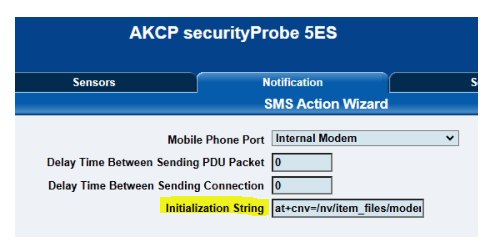
Save the SMS action. Execute the SMS action once with the “Test Action” button, wait a few minutes, and then download a backup file from the SEC 5ESV. Please rename this file to backup step 2.cfg.
3) Reboot the SEC 5ESV
Unplug the SEC 5ESV PSU for 1 minute, and then plug it back in. After adding the SMS method changing commands above, this reset is needed once to fully reinitialize the modem.
4) Retest SMS
Test the SMS sending action again after the SEC 5ESV is powered up.
5) Test a Telephone Call Action
Please also test a Telephone Call action once, assuming the SIM card has call credit.
6) Download Final Backup File
If still having the same problem, download another backup file and rename it to backup step 6.cfg. Please send us the results to support@akcp.com and all the requested backup files so we can investigate further.
Normally following Step #2 above will resolve the issue.
Best regards,
AKCP Support Team
- AKCP Support Team answered 5 months ago
- last edited 5 months ago
- You must login to post comments
Hello AKCP Support,
Thank you for all your help and the very good details. Following your suggestion on Step #2 resolved the problem and we can now send out the SMS alerts successfully.
We really appreciate your support!
Best regards,
AKCP Customer
- AKCP Support Team answered 5 months ago
- You must login to post comments
Please login first to submit.