
Hello AKCP team. we have several remote sites, all with AKCP securityProbe 5ES-X20’s. We generators that charge batteries overnight and we know the generator is running via a dry contact “Generator Running” that is trended. What I would like to know is: Is there a way to integrate this “generator running” into a total daily generator runtime calculation?
Many thanks…
- herc asked 3 months ago
- You must login to post comments
Dear valued customer,
Thank you for your post and the question regarding your generator run time and how to track this.
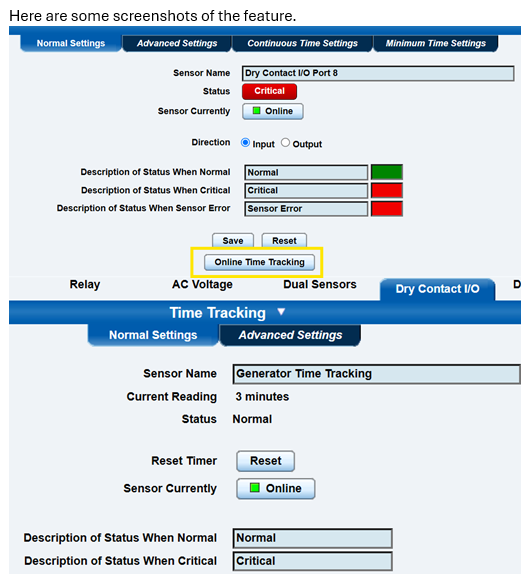
To integrate your “Generator Running” status into a total daily runtime calculation on your securityProbe 5ES-X20 units, you can use the built-in Time Tracking feature for Dry Contact sensors (DCS15).
Here is how you can set this up:
Navigate to the setting page of the Dry Contact sensor that monitors your generator.
Scroll to the bottom and click the Online Time Tracking button.
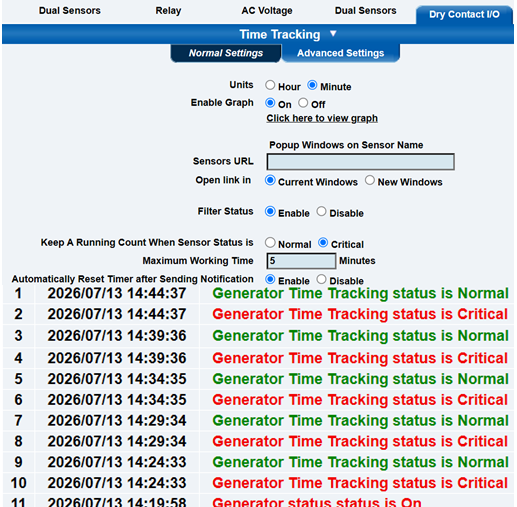
Configure the new Time Tracking sensor to monitor how long the Dry Contact remains in the active running status.
Set a Maximum Working Time (in hours and minutes) and enable the Automatically Reset Timer after Sending Notification option. This will allow the sensor to change status to Critical at your desired interval, trigger any linked automation or alerts, and then reset the timer back to zero. Please note there is also a manual “Reset” button available if you ever need to reset the tracked time yourself.
To receive your daily total: Combine this Time Tracking sensor with the securityProbe Heartbeat Email feature. By setting the Heartbeat Email to a Daily operation, the unit will send you a daily email report of all sensors. This report will include the Time Tracking sensor, giving you the total accumulated generator runtime for that day.
I have included some screenshots of these features below to help guide you through the setup.
Please let us know if you need any further assistance by contacting our support team at support@akcp.com.
Best regards,
AKCP Support Team
- AKCP Support Team answered 3 months ago
- You must login to post comments
Please login first to submit.